
You have seen ads like "Our CRM has AI" and "Machine learning predicts your sales."
Sounds fancy, but half the time, it is just marketing people throwing buzzwords at a wall.
Let me tell you what actually happens with AI and machine learning in modern CRM solutions. The good, bad, and the stuff that will make you want to throw your laptop out a window.
What AI in a CRM Really Does
It is not a robot brain, like something from movies. AI in a CRM is more like a very eager assistant who is great at counting things but has zero common sense. It can spot patterns you'd miss. It can do repetitive tasks without complaining. But it won't understand that your best customer stopped returning calls because their dog just died.
Machine learning only works as well as the data you feed it. If your CRM is packed with typos, half-baked notes, and duplicate contacts, the AI will simply learn bad habits, classic garbage in, and garbage out.
Three Things AI Actually Does Well
When someone does AI and machine learning in modern CRM solutions the right way, you get three real benefits.
- Tells you which leads to call first: Scores leads based on who actually bought before. No more guessing.
- Types of stuff for you: Pulls info from emails and calls; your salespeople stop typing and start talking.
- Suggests what to do next: best time to call, which case study to send and when to move a deal forward.
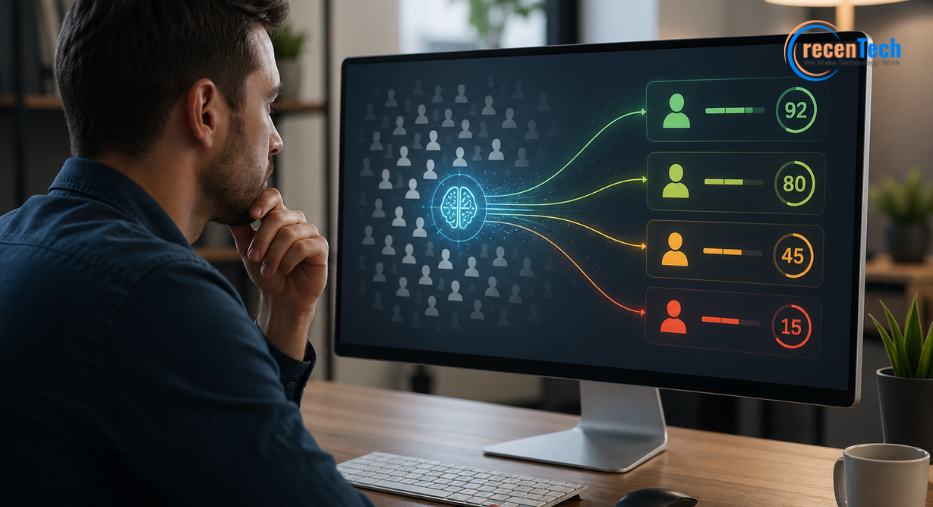
Predictive Lead Scoring
Let me tell you about a real company. They had four thousand leads sitting in their CRM. Salespeople picked the ones they liked. Called them, closed about one out of every ten.
Then they added a predictive scoring tool. The AI looked at every closed deal for the past two years. Found patterns, job title and company size. How many emails did they open, and which pages did they visit on the website?
Every new lead got a score from 0 to 100.
The sales team started calling the 80-plus leads first. Their close rate doubled. Same people. Same product. Just smarter targeting.
That is what machine learning does: it finds signals in the noise, and it gets better over time as it sees more examples.
What You Need Before Scoring Works
You can't just turn this on and magic happens.
- At least 500 closed deals in your history
- Clean data (no "maybe" in the closed field)
- A sales team that actually follows the scores
These three things are important for predictive scoring, otherwise it is just a random number generator with a fancy label.
Automations That Don't Make You Want to Scream
Old school automation was simple. "If someone downloads a PDF, send an email three days later." That's fine, but it's not an AI.
Real machine learning watches your best salespeople and suggests automations that copy their moves.
Example: Your top rep always calls a lead within two hours of a website visit. The AI notices that pattern, and it reminds other reps to do the same. Or it auto-schedules those calls.
Another example: The AI sees that every deal over $50,000 needed a second demo. So, it flags those big deals and suggests a demo before moving to pricing.
These are small things, but they really add up. A few minutes saved per deal times hundreds of deals is real money and real sanity.
When AI Goes Wrong (And It Will)
Nobody warns you about this part. AI in CRMs fails sometimes and is sometimes spectacular.
Here is a common disaster. The AI learns from your past sales data, but your past sales data includes the year your product was terrible. Or when your pricing was nuts, or when your sales team was phoning it in.
The AI does not know the context; it sees patterns. "Leads from industry X never close." So, it scores them low, but those leads might be perfect now after your product is overhauled.
That is why you never let AI make decisions alone. It is a helper, not a boss.
Another problem. Bias. If your sales team ignores certain regions or types of customers, the AI learns that bias. Then it amplifies it. You end up discriminating on scale without even realizing it.
How to Keep AI From Embarrassing You
- Check the AI's suggestions against real results. Do this regularly.
- Keep a human in the loop for any decision that matters.
- Retrain your models every few months with fresh data.
- Don't let the AI automatically delete or archive leads. Just flag them for review.
What to Ask Before You Buy
Not all AI features are equal; here is a checklist for when a vendor starts pitching you.
| Predictive scoring | "Can I see what factors go into the score?" | "It's a black box" |
|---|---|---|
| Lead ranking | "How often does it retrain?" | "Once a year" |
| Email automation | "Does it personalize based on behavior?" | "Only first name" |
| Forecast insights | "Can it explain why the forecast changed?" | "No, trust the number" |
| Data cleanup | "Does it fix duplicates automatically?" | "You handle that" |
If they cannot answer these questions clearly, walk away.
Real Stories from Real Businesses
Let me give you three examples of how AI and machine learning in modern CRM solutions have actually been delivered.
Example one: Stopping churn
A software company noticed that customers who stopped logging in for two weeks left at a high rate. The AI flagged those accounts. The customer success team reached out with a personal note. Churn dropped by a quarter.
Example two: Next, best action
A rep was staring at a list of 200 leads. The AI scanned who’d been on the site, opened emails, and filed support tickets, then said: “Call A, send a case study to B, leave C alone for a week.” The rep did exactly that and ended up closing more deals with a lot less stress.
Example three: Honest forecasting
A manager looked at a pipeline full of "likely to close" deals. But the AI disagreed. It analyzed past win rates at each stage. Deals older than 90 days in stage four closed at only five percent. The manager stopped wasting time on dead deals.
These are not sci-fi; they are happening right now in companies that did AI the right way.
The Messy Prerequisite Nobody Wants to Talk About
Here is the hard truth. If your CRM data is a mess, AI will not save you.
I have seen companies drop fifty grand on AI features. Nothing improved because their salespeople were writing "call me" in the notes field instead of logging real activity.
Machine learning needs structured data, consistent fields, accurate dates, and complete records.
Before you buy any AI-powered CRM, fix your data. Hire someone for a week to clean things up. Run deduplication tools. Set required fields so salespeople can't skip them.
Look, you can buy the smartest AI on the market. But if your data is trash, you just have expensive trash. CrecenTech starts at the beginning. Clean data with clear processes. Then they add the AI tools that actually help.
The Bottom Line
Don't buy a CRM because of its AI features. Buy one because it solves your real problems. Then use AI to work faster.
Do not pick CRM because of its AI features; go for the one that solves your problem in real time.
Start with clean data, train your team. Test the AI's suggestions against your own gut and never let the algorithm make the final call on a big deal.
AI in a CRM is like a calculator that helps you do math faster. But you still need to know which numbers to punch in.
The businesses winning with AI are not the ones with the most expensive software. They are the ones who did the boring work first. Clean data, good habits, and people who actually use the system.
Implement this and then let the machine learn to do its job. You might be surprised.